Are you confused between UI (User Interface) Design and UX (User Experience) Design? You’re not alone. Thousands of students and aspiring designers search for the difference between UI and UX every month before choosing a design course.
Although UI and UX are closely related, they require different skills, tools, and career paths. In this complete guide, you’ll learn the difference between UI and UX Design, career opportunities, salaries in India, required skills, software tools, and how to choose the right course for your future. Whether you’re a student after 10th, 12th, graduation, or a working professional looking to switch careers, this guide will help you make the right decision.
What is UI Design?
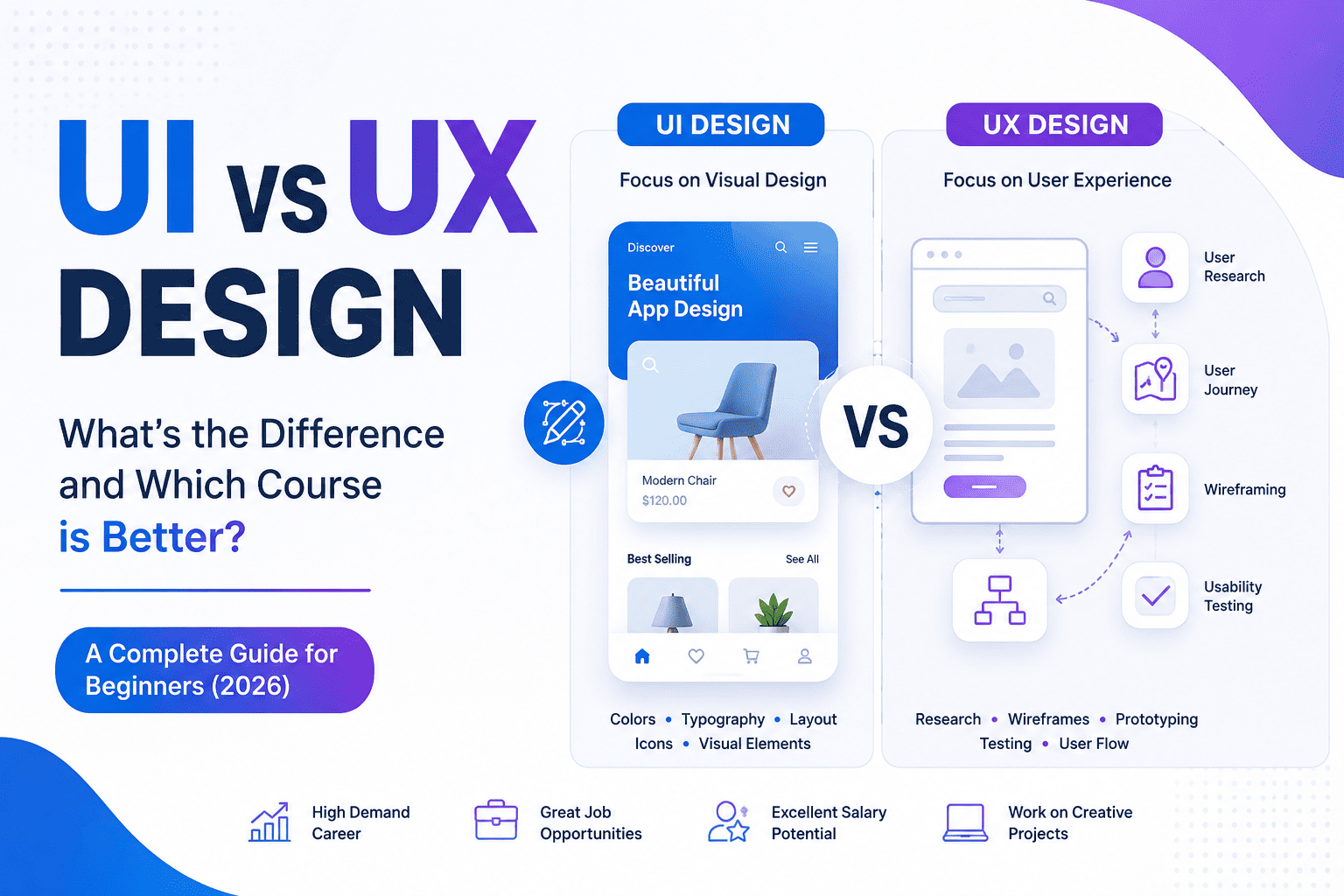
UI (User Interface) Design focuses on the visual appearance of digital products like websites, mobile apps, software, and dashboards.
A UI Designer creates attractive, engaging, and easy-to-use interfaces that users interact with.
Responsibilities of a UI Designer
- Designing mobile app interfaces
- Creating website layouts
- Selecting typography and colors
- Designing buttons, icons, and illustrations
- Creating design systems
- Maintaining brand consistency
- Building responsive layouts
Popular UI Design Tools
- Figma
- Adobe XD
- Adobe Photoshop
- Adobe Illustrator
- Canva
- Sketch (Mac)
What is UX Design?
UX (User Experience) Design focuses on improving the overall experience users have while interacting with a digital product.
A UX Designer researches user behavior, identifies problems, and designs solutions that make products simple, intuitive, and enjoyable.
Responsibilities of a UX Designer
- User Research
- Competitor Analysis
- Information Architecture
- User Personas
- User Journey Mapping
- Wireframing
- Prototyping
- Usability Testing
- User Flow Design
Popular UX Design Tools
- Figma
- Adobe XD
- Miro
- Maze
- FigJam
- Balsamiq
- Notion
UI vs UX Design: Key Differences
| Feature | UI Design | UX Design |
|---|---|---|
| Full Form | User Interface | User Experience |
| Main Focus | Visual Design | User Satisfaction |
| Objective | Attractive Interface | Easy & Smooth Experience |
| Work Type | Design Screens | Solve User Problems |
| Skills | Creativity | Research & Problem Solving |
| Output | High-Fidelity Designs | User Flows & Wireframes |
| Software | Figma, Photoshop, Illustrator | Figma, Miro, FigJam |
| Involvement | Visual Stage | Entire Product Journey |
Simple Example
Imagine using a food delivery app.
UI Design
- Beautiful buttons
- Attractive icons
- Modern colors
- Clean typography
- Professional layout
Everything looks visually appealing.
UX Design
- Easy login
- Quick search
- Fast checkout
- Simple payment process
- Easy order tracking
Everything feels effortless and user-friendly.
UI is how a product looks. UX is how a product works and feels.
UI Designer vs UX Designer
UI Designer
Skills Required
- Creativity
- Color Theory
- Typography
- Layout Design
- Graphic Design
- Branding
- Responsive Design
Daily Tasks
- Designing screens
- Creating icons
- Building design systems
- Working with developers
- Improving visual consistency
UX Designer
Skills Required
- User Psychology
- Research
- Wireframing
- Analytical Thinking
- Problem Solving
- Communication
- Testing
Daily Tasks
- Interviewing users
- Creating wireframes
- Conducting usability tests
- Improving navigation
- Designing user journeys
UI & UX Design Process
A successful digital product typically follows this workflow:
- User Research
- Competitor Analysis
- User Personas
- User Journey Mapping
- Wireframing
- Prototyping
- UI Design
- User Testing
- Development
- Product Launch
Which Course is Better: UI or UX?
The answer depends on your interests.
Choose UI Design if you enjoy:
- Graphic Design
- Creativity
- Color combinations
- Visual layouts
- Branding
- Illustrations
Ideal for creative individuals who love designing beautiful interfaces.
Choose UX Design if you enjoy:
- Research
- Psychology
- Problem-solving
- Data analysis
- User behavior
- Product improvement
Ideal for analytical thinkers who enjoy understanding people and improving experiences.
Why Learn Both UI and UX Together?
Today, most companies prefer professionals with knowledge of both UI and UX.
Learning both provides:
- Better job opportunities
- Higher salary potential
- More freelance projects
- Complete product design knowledge
- Stronger portfolio
- Faster career growth
This combination is commonly offered as a UI/UX Design Course.
Latest UI/UX Design Trends in 2026
The design industry is evolving rapidly with AI and immersive technologies.
Current trends include:
- AI-assisted interface design
- Voice User Interfaces (VUI)
- Dark Mode Optimization
- Micro-interactions
- Glassmorphism
- Neumorphism
- Motion UI
- AR & VR Interface Design
- Accessibility-first Design
- Responsive Design Systems
- AI Wireframing
- Design Tokens
Software You’ll Learn in a Professional UI/UX Course
A comprehensive UI/UX Design program should include:
- Figma
- Adobe Photoshop
- Adobe Illustrator
- Adobe XD
- FigJam
- Miro
- Canva
- AI-powered Design Tools
- Prototyping Tools
- Collaboration Platforms
Career Opportunities After a UI/UX Course
Demand for UI/UX professionals continues to grow across industries.
Popular job roles include:
- UI Designer
- UX Designer
- Product Designer
- Visual Designer
- Interaction Designer
- Mobile App Designer
- Web Designer
- Design Researcher
- UX Researcher
- Information Architect
- Design System Specialist
- UI Developer
- Creative Designer
- Freelance UI/UX Consultant
Average Salary of UI/UX Designers in India (2026)
| Experience | Average Annual Salary |
|---|---|
| Fresher | ₹3.5 – ₹6 LPA |
| 2–4 Years | ₹6 – ₹10 LPA |
| 5–8 Years | ₹10 – ₹18 LPA |
| Senior Designer | ₹18 – ₹30+ LPA |
| Freelancers | ₹50,000 – ₹3,00,000+ per project |
Note: Salaries vary depending on skills, portfolio, location, company, and project complexity.
Who Should Join a UI/UX Design Course?
This course is suitable for:
- Students after 10th
- Students after 12th
- College students
- Graduates
- Graphic Designers
- Web Designers
- Front-end Developers
- Digital Marketing Professionals
- Entrepreneurs
- Freelancers
- Career Switchers
No coding knowledge is required for most beginner-level UI/UX courses.
Benefits of Learning UI & UX Design
- High-demand career
- Excellent salary packages
- Global job opportunities
- Remote work flexibility
- Freelancing opportunities
- Creative work environment
- Strong career growth
- Startup-friendly skills
- AI-powered design workflows
- Future-ready profession
How to Choose the Best UI/UX Design Course
Before enrolling, ensure the course includes:
- Government or industry-recognized certification
- Live project-based learning
- Portfolio development
- Internship opportunities
- Placement assistance
- Latest AI-integrated design tools
- Experienced mentors
- Practical assignments
- Mock interviews
- Resume and portfolio guidance
Frequently Asked Questions (FAQs)
1. What is the main difference between UI and UX Design?
UI Design focuses on the visual appearance of digital products, while UX Design focuses on improving usability and the overall user experience.
2. Which is easier to learn: UI or UX?
UI is generally easier for individuals with a creative background, whereas UX involves more research, analysis, and problem-solving. Both can be learned with structured training and consistent practice.
3. Should I learn UI or UX first?
Most beginners benefit from learning UX fundamentals first, followed by UI Design. Comprehensive courses typically integrate both disciplines for a well-rounded skill set.
4. Is coding required for UI/UX Design?
No. Most UI/UX Designers do not need coding skills, although understanding HTML and CSS can improve collaboration with developers.
5. Which software is best for UI/UX Design?
Figma is currently the most widely used platform for UI/UX Design because of its collaborative features, prototyping capabilities, and industry adoption.
6. Can I become a UI/UX Designer after 12th?
Yes. Students can start learning UI/UX Design after completing 12th and build a strong portfolio to pursue internships or entry-level roles.
7. Is UI/UX Design a good career in 2026?
Yes. With businesses prioritizing digital products, demand for skilled UI/UX professionals continues to rise across technology, healthcare, finance, education, and e-commerce sectors.
8. What is the average duration of a UI/UX Design course?
Most professional programs range from 3 to 12 months, depending on the depth of the curriculum and practical training.
9. Can I freelance as a UI/UX Designer?
Absolutely. Many UI/UX Designers work as freelancers, collaborating with startups, agencies, and international clients on websites, mobile apps, and SaaS products.
10. Does AI replace UI/UX Designers?
No. AI accelerates repetitive tasks such as wireframing, layout generation, and design suggestions, but human creativity, user empathy, strategic thinking, and usability testing remain essential.
Conclusion
UI and UX Design are two complementary disciplines that together create successful digital experiences. While UI Design focuses on aesthetics and visual interaction, UX Design ensures products are intuitive, accessible, and enjoyable to use. Rather than choosing one over the other, developing skills in both can significantly improve your employability, earning potential, and versatility in the modern design industry.
As organizations continue to invest in digital transformation, professionals with expertise in UI/UX Design, prototyping, user research, design systems, and AI-assisted design tools will remain in high demand. If you’re looking for a creative, future-ready career with opportunities in full-time employment, freelancing, or entrepreneurship, enrolling in a comprehensive UI/UX Design Course is a smart investment for 2026 and beyond.